Showing posts with label SAP SLT. Show all posts

Tuesday, 16 July 2024

what is latency in the SAP SLT and How to check Latency?

 Latency in SAP SLT (SAP Landscape Transformation Replication Server) refers to the time delay between the creation or modification of data in the source system and the point when this data is replicated and available in the target system. Several factors can influence latency in SAP SLT, including:


  1. Network Bandwidth and Latency: The speed and quality of the network connection between the source and target systems can significantly impact replication times.

  2. Source System Load: The performance of the source system, including how busy it is with other processes, can affect the speed at which data can be extracted.

  3. SLT Server Configuration: The configuration and capacity of the SLT server, including hardware resources and tuning parameters, play a critical role in determining replication speed.

  4. Data Volume: The amount of data being replicated can influence latency. Larger data volumes typically take longer to process and replicate.

  5. Transformation Rules: If data transformations are applied during replication, the complexity and number of these rules can add to the processing time.

  6. Target System Performance: The speed and efficiency of the target system in receiving and processing the incoming data also affect overall latency.

Managing and optimizing these factors can help reduce latency and ensure more timely data replication in SAP SLT environments.

Wednesday, 12 July 2023

2993246 - What is write behavior? - SAP SLT

  • What is writing behaviour?
  • How many kinds of written behaviour and what are they?

Environment

SAP Landscape Transformation replication server

Resolution

The write behavior determines how changes to the target system database occur.

You can specify the following write behaviors:

  • Array Insert

With array insert, all transferred data records from the source system table that belong to a data portion are written to the target database in one insert operation.

If a duplicate entry for a key field is found, no records from the relevant portion are written to the target database (the changes are rolled back). The system sets the status of the portion to Failed, and an error message is written to the application log. Note that you view that status of the portion in transaction LTRC (tab page Load Statistics).

  • Single Insert

With single insert, each transferred record from the source system table is written to the target database using a separate insert operation.

If a duplicate entry for a key field is found, the relevant record is not written to the target database. All other records are written to the target database.  Regardless of whether any duplicate entries for key fields occur, the system sets the status of the portion to Finished once the target database operation is complete. The system creates an entry in the application log for any duplicate entries found.

  • Array Modify

With array modify, all transferred data records are written to the target database in one operation.

If a duplicate entry for a key field is found, the relevant record is written to the target database (the existing record is overwritten). All other records are written to the target database. Regardless of whether any duplicate entries for key fields occur, the system sets the status of the portion to Finished once the target database operations are complete.

This write behavior can be advantageous if you expect duplicate entries for key fields to occur, and you want to overwrite the target system database records with those from the source system.

  • Array Insert with Duplicate List

The system first uses the write behavior Array Insert. If no duplicate entries for key fields are found, no further action is taken. That is, all transferred data records from the source system table that are written to the target database in one insert operation.

However, if a duplicate entry for a key field is found, the system executes a second insert operation by using the write behavior Single Insert. This is done in order to identify the duplicate entries. However, the relevant record is not written to the target database (the changes are rolled back).

If duplicate entries for key fields occur, the system sets the status of the portion to Error. The system creates an entry in the application log for any duplicate entries found.

This write behavior can be advantageous if you expect duplicate entries for key fields to occur, and you want to analyze these entries. You can view the duplicate entries for the key fields in the application log, and decide how they should be handled.

  • Sum Up

Each transferred record from the source system table is written to the target database using a separate insert operation. If a duplicate entry for a field of type Currency or Quantity is found, the system performs a SUM operation. That is, the system increases the amount in the target system record by the amount in the record to be inserted

  • Dynamic Single Insert

The system uses the write behavior Array Insert. If no duplicate entries for key fields are found, no further action is taken. That is, all transferred data records from the source system table that are written to the target database in one insert operation.

However, if a duplicate entry for a key field is found, then the system uses the write behaviour Single Insert. This is done in order to identify duplicate entries. The relevant record is not written to the target database.

If duplicate entries for key fields occur, the system sets the status of the portion to Finished. The system creates an entry in the application logs for any duplicate entries found.

This write behavior can be advantageous if you expect duplicate entries for key fields to occur, and you want to retain the target system database records.

  • Update Set

You can use this write behaviour to change specific field values for the target system table.

If you want to change such values, we recommend contacting SAP in order to engage the services of SAP consulting.

  • Delete

You can use this write behaviour to delete data records from the target system database. Note that this means that if the target system already contains these records, they will be deleted.

If you want to restrict the set of data to be deleted, we recommend contacting SAP in order to engage the services of SAP consulting.

https://me.sap.com/notes/0002993246


Thanks 

Tuesday, 21 February 2023

SAP LT Replication Server Cockpit - Expert Functions details - Reset Status for Triggers and Logging Tables

Hi Guys,

we frequently use all these functions but must know the details. in this blog, we are going to see about expert functions of SLT Configuration ( SAP)

Note: All this information available in SAP Application 

 A: Reset Indicator/Status 

   1: Reset Status for Triggers and Logging Tables

Features

You can use this step to reset flags for the tables listed on the Table Overview tab page.

You can reset the following flags:

•Failed

•In Process

•Logging Table Created

•Trigger State

Selection

You must specify a mass transfer ID. If you want to restrict the selection to certain tables, you can specify in the Table Name fields. Otherwise, the system resets the relevant status for all tables of the mass transfer ID.


You can reset the following flags:

•In Process: 

You can reset this flag if a table remains in the status In Process, but does not make any progress. Do not reset this flag if a table is still being processed by a job as some actions could be executed twice for the same table and this could result in errors.

•Failed: 

You can reset this flag if a table has the status Failed, and you want to manually reset the flag. This flag can be reset at any time; tables are not processed if they have the status Failed.

•Logging Table Created: 

You can reset this flag if you deleted the logging table manually in the source system, and you want to recreate the logging table. For 1:N replication scenarios, you should also ensure that the consumer registration was reset correctly in the source system (you can use the 1:N health check to verify this). If the initial load or the replication is already running for a table, do not recreate missing logging tables as delta tables might already be missing. Instead, you can stop and restart the table in the data provisioning UI (accessible from the Table Overview tab page).

•Trigger State: 

You can reset this flag if you deleted the trigger manually in the source system, and you want to recreate the database trigger. If the initial load or the replication is already running for a table, do not recreate the missing triggers as delta tables might already be missing. Instead, you can stop and restart the table in the Data Provisioning dialog box (accessible from the Table Overview tab page).


Thanks 

Rupesh Chavan


SLT table replication ABAP dump Error : The current ABAP program "DMC_CALL_OLC" had to be terminated because it found a statement that could not be executed or SYNTAX_ERROR

Applicable to : S4HANA  S4CORE 106 S4CORE & SLT SERVER 2.0 

Note: due to ABAP dumps if you stopped replication of the respective table still performed the below steps, You would get the message that the table is not available as it's not available in the SLT configuration. Once all steps are executed successfully then add the table again for replication. it will work

Error : 

Category                        ABAP programming error                                                       

Runtime Errors               SYNTAX_ERROR                                                                 

ABAP Program                /1LT/XXXXX960000100000*****                                               

Application Component    Not Assigned 

The current ABAP program "DMC_CALL_OLC" had to be terminated because it found a statement that could not be executed.

In include "/1LT/XX96000010000010175TOP", in line 150 of the program                 

"/1LT/XXXXX96000010000010175", the following syntax errors 

Cannot update logging table in the sender system

Error while processing runtime objects

Resolution: 

Note: It's recommended to specify the table name in the below Expert Functions to ensure the steps are not run for all tables


1: Choose a configuration in the LTRC transaction on the SLT system and deactivate the configuration. 


or open configuration and click on Administration Tab, click on the "Deactivate" button 

Go to the "Expert functions" tab

S4HANA Expert functions


SLT SERVER 2.0 


1: Double-click on "Reset Runtime Objects Flags"  

Note :- in S4HANA 2021 Reset option is not available only the delete the generated runtime modules option is given. please refer above snaps 


  1. Enter in table name, or subset of table names, or leave blank to make changes for all tables
  2. Click Execute
2: Now Double click on "Reset Load and Replication Status"


  1. Enter in table name, or subset of table names, or leave blank to make changes for all tables
  2. In function Reset Load and Replication Status, uncheck the first two boxes which are checked when you first see the screen, and check the two boxes which are initially unchecked (see screenshot above)
  3. Click Execute

      4. Go to "Processing Steps" tab

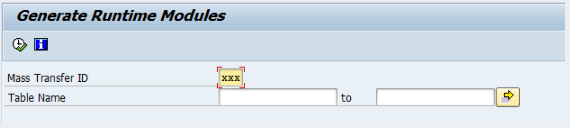
3: Double Click on "Generate Runtime Modules"


  1. Enter in table name, or subset of table names, or leave blank to make changes for all tables
  2. Click Execute
4: Double Click on "Start Range Calculation"


  1. Enter in table name, or subset of table names, or leave blank to make changes for all tables 
  2. "Number of jobs" leave blank
  3. Click Execute

5: Go to "Administration Tab" & Click on the "Activate" button


Now you can add table for replication again. 


Thanks 

Rupesh Chavan


Wednesday, 19 August 2020

Missing database trigger on the source system.


 We are going to see "Missing database trigger on the source system". we may face this error after system refresh or in a situation when database trigger got deleted or regenerated in the source system. 


System Response

The database triggers for a table were regenerated and replication was stopped for that table.

Changes made to the source database tables made while the triggers are not active cannot be replicated into the HANA system. Data inconsistencies could occur.

Procedure

Replication can be resumed by manually resetting the failed flags in iuuc_tables and dmc_mt_tables for that particular table and mass transfer. The replicated table might be inconsistent. In order to have a consistent state, a reload of the entire table is recommended.

1: Log in to the SLT system. 

A: Go to LTRC-Expert Function -> Reset Status for Triggers and Logging Tables | Select all ” flag'

  1. as shown below select options and click on execute. 

we get below output 


  1. B: Go to LTRC-Expert Function-> Reset load and replication status check flags as shown below and click on execute.


Now we will get below screen


Click continue, will get a blow screen


Now go again in LTRC --> table overview and check tables status. 

Now table trigger is created and the database trigger the inconsistency issue resolved. 


Thanks